A step-by-step guide for operators granting awards to participants: schemas, assets, vesting types, and advanced settings.
Author:
Robert Capla
This article is designed to help operators efficiently navigate through the steps involved in granting awards to participants, covering award schema selection through advanced settings configuration.
Process steps
The Award Process follows the general process steps outlined in this article.
Creating a new award
Selecting an award schema
Initially, you need to choose an award schema. Schemas define various configurations and behaviors (for detailed information, please refer to the Process Schemas article). Every plan typically includes some of these three default award schemas:
Three default award schemas are typically available:
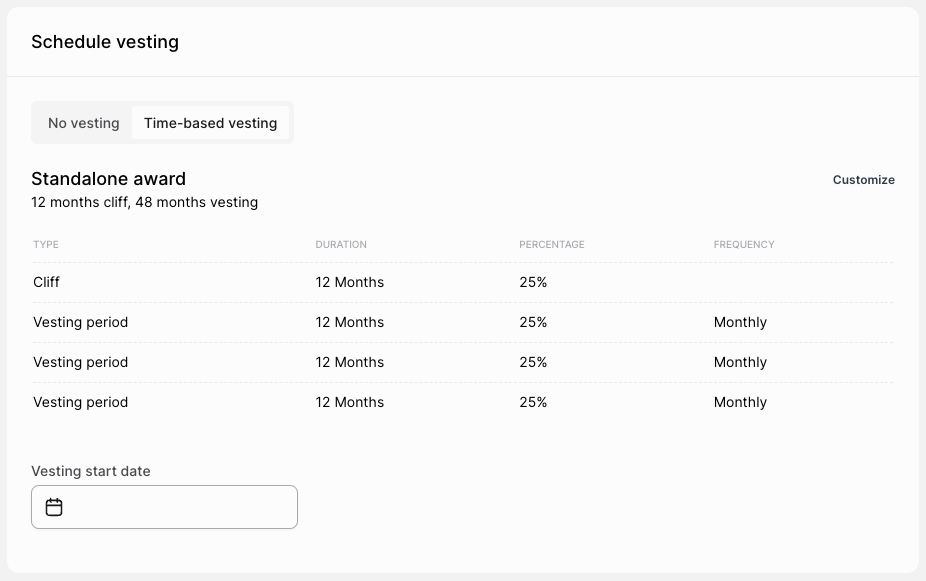
Standalone Award: A standard award with a four-year linear monthly vesting and a one-year cliff.
One-off Swap Award: An equity award granted in exchange for a one-time cash bonus, without vesting.
Advance Swap Award: An equity award in exchange for an annual salary increase, featuring a 12-month linear monthly vesting period without a cliff.
Please note that your plan may include different schemas based on your specific setup and preferences.
Selecting a participant
Choose the participant to receive the award. The selection box has a search feature; if the participant is not immediately visible, type their name to locate and select them. A participant can be awarded unless they are currently in a termination process. To award a participant undergoing termination, first resolve or delete the termination process, then proceed with the award process.
Assets
In this section, enter the grant amount and other relevant values for processing the award. The award size can be defined using one of three fields, which are interconnected; a change in one field reflects in the others:
Number of Assets: Enter the exact number of assets (Phantom Shares or Options) here.
Total Value: Used to enter the monetary value of the award based on the current valuation, particularly with swap award schemas. The final number of assets is calculated using the "Price per Asset" field.
Percentage of Company Shares (%): Use this to grant an award representing a specific percentage of the company (e.g., 1% of all company shares).
Additional fields:
Price per Asset (PPA) is only editable for swap schemas. Adjusting this allows for the proper calculation of the number of shares from the Total Value if the agreed PPA differs from the current valuation. The default is the current valuation's PPA.
Initial Value is the baseline value assigned to phantom shares at the time of granting in a Phantom ESOP Plan. It is used to calculate the payout based on the difference between the Initial Value and the value at redemption (e.g., Initial Value: $10 per PS, Value at Redemption: $15 per PS, thus Employee's Payout per Share: $15 minus $10 = $5 per PS). Note that for swap awards, the Initial Value is 0, because the participant already "paid" for the assets, so the initial value is disregarded.
Vesting
Three vesting types are available:
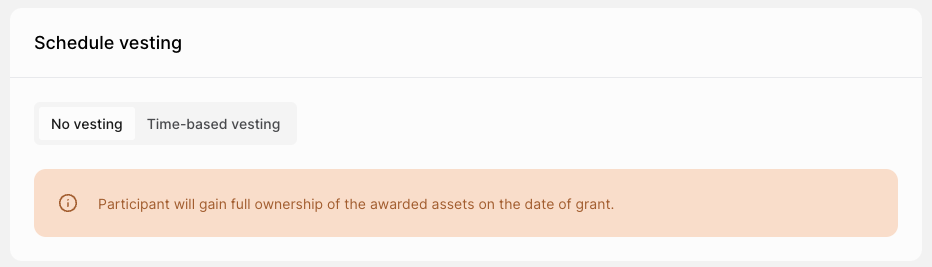
No Vesting (Immediate): Awards are fully owned and available to participants as soon as they are issued.
Time-Based Vesting: Awards are earned over a set period, such as a four-year monthly vesting with a one-year cliff. Operators input vesting start dates, customizable via the Customize button.
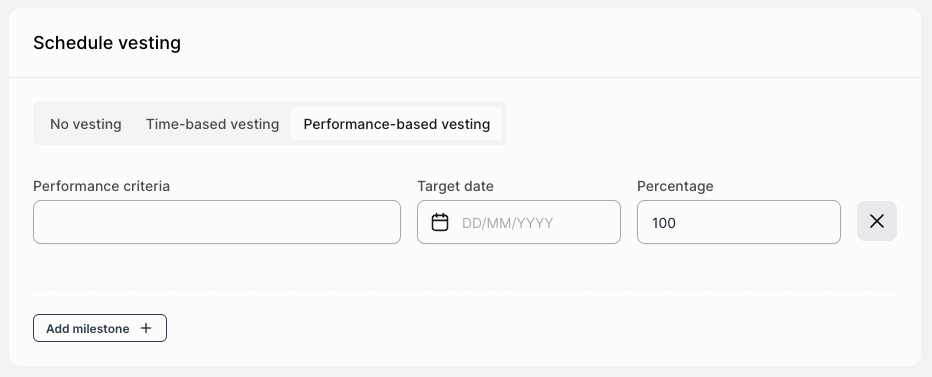
Performance-Based Vesting: Operators can add multiple milestones to an award, with each evaluated separately on its target date.
No vesting
With no vesting, participants gain ownership on the grant date. Unless specified otherwise in Advanced Settings, the grant date is the date when all documents are successfully signed. If there's no signing process, it defaults to the process publish date.
Time-based vesting
The vesting schedule from the chosen schema is predefined. Operators only need to input the vesting start date, which can also be set in the past or future. Operators can customize the vesting schedule using the "Customize" button, altering frequency, cliff, vesting period lengths, and asset percentages. A reason must be provided for any deviations from the default schedule.
Performance-based vesting
Operators can add multiple milestones to an award, with each evaluated separately on its target date.
Advanced settings
Two customizable options:
Accelerate Vesting in Case of Exit: Enables full vesting upon company exit.
Grant Date: The grant date is typically set as the date when all necessary documents are successfully signed. However, in the Advanced Settings, you have the option to specify a different grant date. This can be useful in scenarios where the documents were signed outside of Eldison platform.
You are in control. We need your consent so that we and our trusted partners can store and access cookies, unique identifiers, personal data and information about your browsing behaviour on your device. See further privacy information.
Legal topics come up in many moments of growth, from fundraising and ESOPs to contracts, hiring and new markets. We share short, practical notes from the Eldison team, based on what founders and growing teams deal with in real life.